SECURITY ANALYSIS
Govern the action, not just the chatbot: a practical agentic AI control plan
Discover AI use, separate data access from action authority, and validate identity, tool boundaries, approvals and emergency stopping for connected AI workflows.
By Harpreet Singh, CISSP, CCSP · Published November 22, 2026
An assistant that summarizes a document and an agent that can change a customer record may use the same model, but they do not carry the same operational authority. The important security question is what the workflow can read, change and send—and which trusted component can stop it when a request is wrong.
A useful governance plan follows that authority across identities, retrieved information, connected tools and approval points. It gives the business a way to adopt useful artificial intelligence (AI) while keeping consequential actions bounded, reviewable and recoverable. The controls below build from a simple workflow map to practical tests of those boundaries.
In this guide
Scope and prerequisites
This guide covers enterprise AI assistants and agents connected to documents, repositories, ticketing, identity systems or other APIs. Not every AI product is autonomous or holds write permissions. Establish the capabilities actually deployed rather than assuming that every chatbot presents the same risk.
Begin with a named business use case and a safe testing environment. Include security, platform, identity and data owners; involve privacy, legal and procurement specialists where data processing or contractual terms need review. This is an operational security plan, not a claim that completing it establishes regulatory compliance.
The immediate goal is a bounded pilot with defensible access, approvals and evidence. Discovery can begin quickly, but a comprehensive programme cannot be completed in one afternoon. A complex workflow may depend on suppliers, multiple tenants and downstream services that require separate investigation.
Foundations: six boundaries to identify
| Boundary | Practical question | Typical evidence |
|---|---|---|
| User to application | Who requested the task and for what tenant? | Authenticated requester and task record |
| Application to model | What instructions and data are sent? | Approved configuration and data handling review |
| Retrieval to context | Which documents can inform this task? | Source-level access checks and provenance |
| Model to tool | Which proposed operation is permitted? | Schema validation and tool-side authorization |
| Tool to destination | Which object or recipient can be affected? | Scoped target and destination restrictions |
| Action to record | How can an operator reconstruct the result? | Correlated action outcome and minimal audit trail |
OWASP describes excessive agency in terms of unnecessary functionality, permission or autonomy. Prompt injection concerns model behaviour influenced by untrusted input; retrieval and fine-tuning do not eliminate that risk. These ideas support treating an agent’s proposed action as something to authorize, not an instruction to execute automatically. [1] [2]
Discover use without creating an intrusive data collection project
Combine existing application inventory, approved procurement records, identity-provider app grants, enterprise browser extension policy and platform configuration. Network observations can identify some destinations but may not reveal embedded AI features or the tenant being used. Record discovery limitations rather than declaring the inventory complete from one log source.
Use a short intake record: purpose, business owner, technical owner, users, data classes, model provider, connected systems and available actions. Ask whether the workflow retains memory, writes files, sends messages or creates scheduled jobs. Those features can leave state behind after the visible chat ends.
Handle employee information through established authorization and privacy processes. Do not collect personal prompts or private browser histories just to find AI usage. Start with enterprise configuration and minimal metadata. Give users a clear route to register useful workflows so the programme supports safer adoption rather than only issuing bans.
Classify each discovered use as approved, pending review, prohibited under policy or unknown. Unknown is an investigation state, not evidence of wrongdoing. Keep a follow-up owner and date, and document approved alternatives where a risky workflow is being replaced.
Draw the workflow, including state and downstream effects
Trace one representative task from requester to data source to model to tool and final destination. Include intermediate storage, caches, conversation history, vector indexes, job queues and audit systems. Label trust boundaries and identify which component makes each authorization decision.
A read-only tool can still expose sensitive information through its output or a later message. A write-capable tool can affect systems even when the model’s final response looks harmless. The review therefore needs both information-flow and action-flow views. Identify whether a downstream system may treat the output as code, a command or a business instruction.
Record who operates each tool server and which release or configuration is in use. A connector name is not evidence that its permissions are appropriate. Review the actual granted scopes, resource restrictions and token audience. Keep credentials out of the diagram; reference the controlled secret record instead.
Design identity and permission boundaries
Prefer a dedicated workload identity with the least authority needed for the defined task. Where delegated user access is required, preserve the user’s resource boundaries and establish how the downstream service verifies delegation. Do not assume the agent inherits correct object-level permissions merely because it was launched by an authenticated employee.
Enforce tenant, object and action checks at the tool or service boundary. A model-supplied tenant identifier must not decide which tenant the caller can access. Validate the authenticated context and deny cross-tenant or out-of-scope objects before execution. Separate read, draft and commit capabilities where the workflow allows it.
Prefer limited-duration credentials with restricted audience and resource access where supported. Rotation and revocation must be operationally usable. Avoid broad administrative tokens, shared personal credentials and unrestricted shell access for a narrow task. If an integration cannot support the required boundary, reduce the task or keep the workflow manual.
Test the identity under the same route and deployment as production will use. An administrator’s successful demonstration says little about the workload identity’s effective access. Keep proof that permitted actions work and denied actions remain denied; neither a role name nor a settings screenshot establishes the entire permission model.
Treat content as information, not authorization
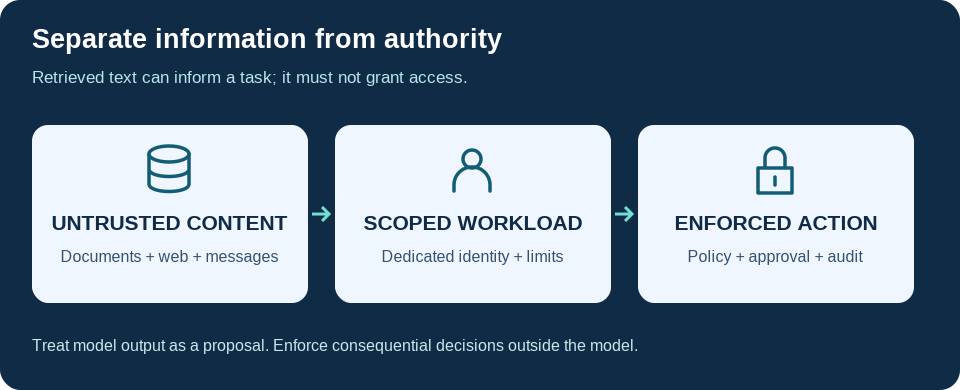
External pages, repository files, retrieved documents and tool results can contain instructions unrelated to the authorized task. They may also contain ordinary text that resembles instructions. Separate their provenance from the user’s request, and avoid letting retrieved material grant new permissions, redirect confidential output or redefine the workflow.
Input filtering, content scanning and clear instruction separation can reduce some risks, but none is a complete prompt-injection solution. Sanitizing text is not equivalent to removing every semantic instruction. Keep enforceable limits on tools, destinations and data even if the model misinterprets a document.
Use allowlisted operation types and strict schemas for structured tool calls. Validate length, type, resource identifiers and permitted destinations in trusted code. Rendering model output also needs ordinary application protections, such as safe handling of markup. These controls address specific boundaries; they do not establish that the model’s answer is truthful.
When an action is ambiguous, request human clarification or produce a draft. The system should not resolve missing authority by guessing. A useful safe failure tells the operator what was blocked and why, without exposing confidential prompt content or credentials.
Make human approval specific and resistant to substitution
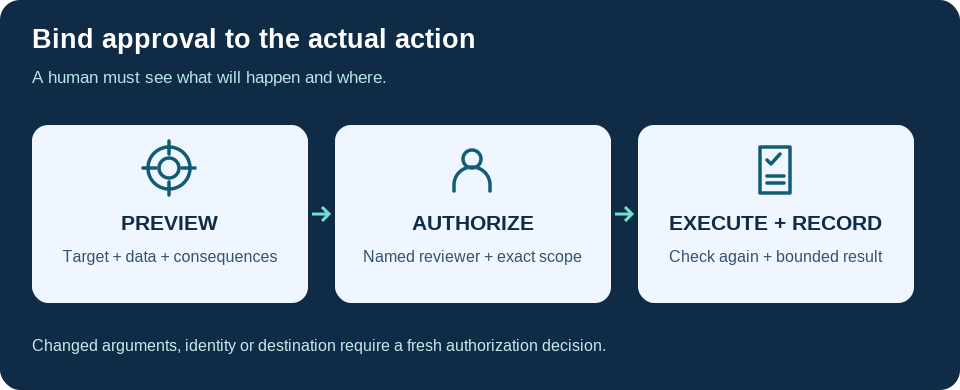
Approval should show the exact action, affected object, recipient or destination, data being transmitted and meaningful consequences. “Allow the agent to continue” is insufficient for an action whose target can change after approval. Keep read-only suggestions separate from sending, deleting, granting access or modifying production state.
Bind approval to the exact arguments or a tightly constrained scope. Revalidate permissions at execution time and reject changed, stale or already-used approvals. Where the action is consequential, identify the approving person and retain the minimal evidence needed to reconstruct the decision. The model should not be able to approve its own proposal.
Consider time-of-check/time-of-use gaps. A record may change between preview and execution; a recipient may resolve to a different destination. Define whether the tool must compare a version, obtain a fresh preview or refuse execution. An approval screen is useful only when the executed operation matches what the person saw.
Data handling and supplier review
Separate data classification, access permission, retention, training use, residency and onward processing. A supplier’s enterprise label does not establish any of these facts for your subscription and configured feature. Verify current contractual terms and technical settings with the appropriate owner; do not assume zero retention or absence of human access.
Minimize what the model receives. Retrieve only the authorized material needed for the task, and avoid including credentials, unnecessary personal records or entire document collections by default. Derived outputs and embeddings can still contain sensitive information; review their access and deletion lifecycle.
Define which destinations may receive output, including logs, collaboration tools and export files. An egress control should validate the destination and applicable data rules outside the model. Domain filtering can support this control, but cannot determine every permitted use of a shared SaaS domain or protect an overprivileged connector.
NIST’s AI RMF and generative AI profile provide risk-management context. Use them to structure ownership, measurement and ongoing review rather than advertising a completed checklist as AI certification. [3] [4]
Build an evaluation matrix that tests boundaries
Start with synthetic information and harmless sandbox actions. Define the expected result before each test. Cover normal tasks, denied operations, cross-tenant objects, unavailable tools, unexpected tool output, ambiguous requests and misleading instructions in retrieved content. You do not need a live secret or a destructive action to demonstrate that a boundary is enforced.
Evaluate the entire workflow, not only the model response. Check the proposed call, the tool’s authorization decision, actual side effects and recorded result. A refusal in chat does not prove that no background action occurred. A plausible success message does not prove that the service completed the operation.
Exercise retries, cancellation and duplicate requests. Use idempotency or equivalent service protections for supported write operations so a retry cannot create unintended repeated effects. Decide how partial completion is reported: an agent must not silently treat one successful step as completion of the entire task.
| Test | Expected boundary | Evidence |
|---|---|---|
| Authorized task | Only the specified resource and action are used | Tool record and synthetic object result |
| Out-of-scope target | Tool denies independently of model wording | Denial and absence of side effect |
| Misleading retrieved content | No permission or destination expansion | Proposed call and enforcement result |
| Changed approval arguments | Execution rejected or reauthorized | Argument comparison and approval trail |
| Cancellation or revoked token | New work stops under the defined policy | Queue, credential and action records |
Stopping, revocation and recovery
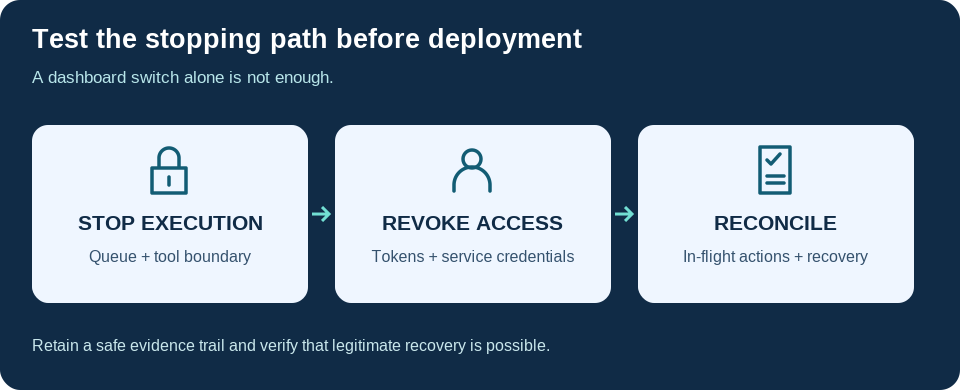
Define how to pause new tasks and stop queued execution at the trusted tool boundary. A user-interface switch may not cancel a worker process, a scheduled task or an already-issued API call. Identify which actions are reversible and which require reconciliation with downstream owners.
Test credential revocation separately from stopping the agent. Existing access tokens, cached sessions and delegated grants may have different lifetimes. Record the actual behaviour for the integration in use, including the time when a denied operation was observed. Do not promise instant revocation without evidence.
After an incident or failed test, preserve the task identifier, tool actions, approval decisions and relevant versions. Minimize captured sensitive content and restrict access. Reconcile in-flight work, restore authorized state where possible and confirm that recovery did not reintroduce the original excessive access.
Three hypothetical adoption decisions
Case A — a knowledge assistant. It reads approved internal documents and drafts answers without external actions. The team concentrates on document permissions, provenance, answer quality and sensitive output handling. It does not add write tools simply because the platform offers them.
Case B — a support agent. It can prepare a ticket reply but requires a reviewer to send it. The approval binds the recipient and content, and the sending service checks that the reviewer is authorized for the ticket. An instruction inside an attachment cannot change the recipient.
Case C — a cloud remediation assistant. It proposes configuration changes but has no broad production administrator credential. A controlled workflow reviews the target and change, executes under a narrowly scoped identity and records the outcome. Where that separation is unavailable, the team retains manual execution. These are fictional design examples, not claims about a tested product.
Operate and improve the pilot
Track approved use cases with complete owners, reviewed connector grants, successful boundary tests, overdue exceptions and unresolved critical dependencies. Keep the denominator and the distinction between discovered and assessed workflows visible. Do not call a count of blocked prompts a count of prevented incidents.
Re-evaluate after changes to the model, system configuration, tool server, data source, retrieval logic or permissions. A model update may affect proposals while a tool update changes the available actions. Retain a small repeatable regression set and review unexpected behaviour before expanding autonomy.
For the first pilot, choose a useful task with low-impact data and reversible outcomes. Demonstrate value and safe refusal before adding more tools. The durable objective is an accountable workflow that remains bounded when a component is wrong, unavailable or influenced by untrusted content.
Your reusable review checklist
Use this checklist to structure your review. Completion is not an automated security assessment. These checkboxes are temporary and are not uploaded or saved.
Download the one-page PDF cheat sheet · Download the blank evidence worksheet (CSV)
Check your understanding
Can a system prompt replace authorization checks on a tool?
No. A prompt is an instruction to a model, not an access-control boundary. The tool or service must enforce caller, object, action and destination permissions.
Does retrieving from an internal document make its instructions trusted?
No. Internal documents can contain stale, malicious or merely irrelevant instructions. Retrieval grants information context, not authority to expand permissions.
Does switching the agent off revoke all access?
Not necessarily. Tokens, queued jobs and already-issued actions can remain active. Test each stopping and revocation mechanism separately.
About this guide
Definitions and attributed framework statements are supported by the primary references below. The workflows, tables and hypothetical examples are original editorial synthesis. No customer environment or product configuration was tested for this article; the examples do not establish compliance or certification. Sources reviewed November 22, 2026.